Prez Overview

Prez is a data-configurable Linked Data API that delivers profiles of Knowledge Graph data according to the Content Negotiation by Profile standard.
Prez is used to publish:
- lists of managed vocabularies
- catalogues of digital resources - highly configurable
- spatial reference datasets
- anything else you can think of stored in a Knowledge Graph!
While being open source, Prez is mostly maintained by KurrawongAI who provide professional services to assist with its use.

Where's the UI?
Prez delivers data only - usually RDF but also GeoJSON, XML etc. - and it delivers a special form of its data which includes all the labels needed for human-readable display.
If you want a UI that can render data as HTML and other fancy graphical widgets, see Prez UI.
Other UIs can be made for Prez too: you don't only have to use PrezUI.
Contents
- Demo
- Installation
- Configuration
- Running
- Redirect Service
- Data Validation
- Contact
- Contributing
- License
Demo
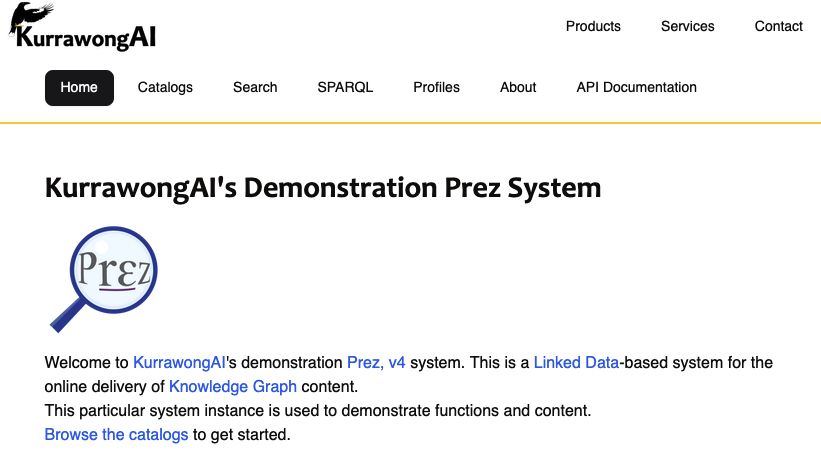
We maintain a demonstration instance of Prez + PrezUI online at:
There you will see a system delivering multiple catalogues of demonstration content and real content from projects re-delivered here for testing.
Browse that system's catalogues - https://demo.dev.kurrawong.ai/catalogs - or search it - https://demo.dev.kurrawong.ai/search - to get a sense of what Prez can do.
Installation
You can run Prez, PrezUI and required databases on your computer either "directly" - using the application's code - or you can use Docker containers we supply for each of the parts.
To see something like the Demo prez instance running, you will need to run:
- an RDF database - we recommend Fuseki but you can use others that support SPARQL
- Prez
- PrezUI
Running directly
Fuseki
See the Apache Jena guide to running Fuseki.
Prez
To get a copy of Prez on your computer, run:
git clone https://github.com/RDFLib/prez
Prez is developed with Poetry, a Python packaging and dependency tool.
Poetry presents all of Prez's dependencies (other Python packages) in the pyproject.toml file located in the project root directory.
To install the Python dependencies run:
poetry install
Note: Poetry must be installed on the system. To check if you have Poetry installed run
poetry --version. For tips on installing and managing specific dependency groups check the documentation.
You will need to configure Prez to "see" the SPARQL Endpoint delivered by Fuseki or your other RDF database. See configuration - SPARQL Endpoint below.
PrezUI
See the PrezUI documentation for links to installation and usage information.
Running Containers
Fuseki
Prez
Prez UI
Configuration
The following Environment Variables can be used to configure Prez.
Note
In most cases all that is required to be set is the SPARQL_ENDPOINT variable.
These can be set in a '.env' file which will get read in via python-dotenv. Alternatively, set them directly in the environment from which Prez is run.
SPARQL Endpoint Configuration
sparql_endpoint: Read-only SPARQL endpoint for Prez.sparql_username: A username for the Prez SPARQL endpoint, if required by the RDF DB. Default isNone.sparql_password: A password for the Prez SPARQL endpoint, if required by the RDF DB. Default isNone.
Network Configuration
protocol: The protocol used to deliver Prez. Default is"http".host: Prez's host domain name. Default is"localhost".port: The port Prez is made accessible on. Default is8000.
System URI
system_uri: An IRI for the Prez system as a whole. This value appears in the landing page RDF delivered by Prez ("/"). Default isf"{protocol}://{host}:{port}".
Logging Configuration
log_level: Logging level. Default is"INFO".log_output: Logging output destination. Default is"stdout".
Prez Metadata
prez_title: Title for the Prez instance. Default is"Prez".prez_desc: Description of the Prez instance. Default is a description of the Prez web framework API.prez_version: Version of the Prez instance. Default isNone.
CURIE Separator
curie_separator: Separator used in CURIEs. Default is":". This separator appears in links generated by Prez, and in turn in URL paths.
Ordering and Predicate Configuration
order_lists_by_label: Whether to order lists by label. Default isTrue.
Label Predicates
Used for displaying RDF with human readable labels.
- label_predicates: List of predicates used for labels. Default includes:
- skos:prefLabel
- dcterms:title
- rdfs:label
- sdo:name
When an annotated (
+anot) mediatype is used, Prez includes triples for every URI in the initial response which has one of the above properties. These annotation triples are then cached. The annotations are used for display purposes, for example HTML pages.
Description Predicates
Similar to label predicates above.
- description_predicates: List of predicates used for descriptions. Default includes:
- skos:definition
- dcterms:description
- sdo:description
Provenance Predicates
Similar to provenance predicates above.
- provenance_predicates: List of predicates used for provenance. Default includes:
- dcterms:provenance
Other Predicates
The annotation mechanism can further be used to generally return certain properties wherever present.
- other_predicates: List of other predicates. Default includes:
- sdo:color
- reg:status
- skos:narrower
- skos:broader
SPARQL Repository Configuration
sparql_repo_type: Type of SPARQL repository. Default is"remote". Options are"remote","pyoxigraph", and"oxrdflib"sparql_timeout: Timeout for SPARQL queries. Default is30.
Contact Information
prez_contact: Contact information for Prez. Default isNone.
Prefix Generation
disable_prefix_generation: Whether to disable prefix generation. It is recommended to disable prefix generation for large data repositories, further, it is recommended to always specify prefixes in theprez/reference_data/prefixes/directory. Default isFalse.
Language and Search Configuration
default_language: Default language for Prez. Default is"en".default_search_predicates: Default search predicates. Default includes:rdfs:labelskos:prefLabelsdo:namedcterms:title
Local RDF Directory
Used in conjunction with the Pyoxigraph repo. Specifies a directory (from the repository root) to load into the Pyoxigraph in memory data graph. Not used for other repository types.
- local_rdf_dir: Directory for local RDF files. Default is "rdf".
Endpoint Structure
endpoint_structure: Default structure of the endpoints, used to generate links. Default is("catalogs", "collections", "items").
System Endpoints
system_endpoints: List of system endpoints. Default includes:ep:system/profile-listingep:system/profile-object
Running
This section is for developing Prez locally. See the Running options below for running Prez in production.
To run the development server (with auto-reload on code changes):
poetry run python main.py
Running in a Container
Prez container images are built using a Github Action and are available here.
The Dockerfile in the repository can also be used to build a Docker image.
Image variants
The image name is ghcr.io/rdflib/prez.
The latest tag points to the latest stable release of Prez. All latest stable releases have a major, major and minor, and major, minor and patch tag pointing to it.
For example, for a release with a git tag of 3.2.4, the following tags will be on the container image:
33.23.2.4latest
New commits to the main branch creates a rolling dev image with the dev tag. The dev builds will also include a tag in the form of major.minor.{patch+1}-dev.{commits-since-last-release}.{short-commit-sha}. This conforms to semantic versioning and will be recognised by orchestration systems to perform automatic releases.
For example, if the latest release is 3.2.4 and there have been 7 new commits since the release and the short commit SHA is fc82562, then the container image tag will be:
3.2.5-dev.7.fc82562
To run the pulled docker image:
docker run -p 8000:8000 \
    -e SPARQL_ENDPOINT=<your_sparql_endpoint> \
    <your_image_id>
The above command starts a Docker container running Prez on port 8000, connected to the specified sparql endpoint.
Testing
Prez uses PyTest and Coverage for testing and test coverage reports.
To run all available tests:
poetry run pytest tests
To run all available tests for coverage analysis:
poetry run coverage run -m pytest tests
To generate a coverage report:
poetry run coverage report
Redirect Service
As a Linked Data server, Prez provides a redirect service at /identifier/redirect that accepts a query parameter iri, looks up the iri in the database for a foaf:homepage predicate with a value, and if it exists, return a redirect response to the value.
This functionality is useful for institutions who issue their own persistent identifiers under a domain name that they control. The mapping from the persistent identifier to the target web resource is stored in the backend SPARQL store.
This is an alternative solution to persistent identifier services such as the w3id.org. In some cases, it can be used together with such persistent identifier services to avoid the need to provide the redirect mapping in webserver config (NGINX, Apache HTTP, etc.) and instead, define the config as RDF data.
Data Validation
For Prez to deliver data via its various subsystems, the data needs to conform to some minimum requirements: you can't, for instance, run Prez in vocabs mode without any SKOS ConceptSchemes defined!
All the profiles listed above provide validators that can be used with RDF data to test to see if it's valid. If it is, Prez will be just fine with it.
The profiles' validators are all available from the profiles themselves (navigate to the listings of other profile resources via the specification links above) and they are also loaded into the RDFTools online tool which you can use without downloading or installing anything:
Look for the VocPrez Compounded and similar validators. The 'compounded' bit means that validator will validate data against all VocPrez and inherited requirements.
Data Management
There are many options regarding data management for the data Prez provides access to.
Fundamentally, the data mush conform to profiles that Prez understands for Prez to be able to work with it, as per Data Validation above, but Prez imposes no constraints on how you organise and maintain the data within the Database it draws from.
If you are stating from scratch, we recomment managing your data with KGM.
KGM
KGM is a tool that performs data management functions, such as synchronising between RDF files in a version control repository and an RDF DB and retrieving labels for IRIs in data from common ontologies and vocabularies.
If data is not too large (multiple files but non more than ~50MB) you may be able to store all the content of your Prez instance in version control like GitHub or DevOps and use a KGM Manifest file to describe what it is and now the KGM tool can synchronise it with your RDF DB.
For larger data, you may still want to synchronise some of your data from version control, such as background vocabularies and models, but deal with large data files/graph separately. You can still use KGM when doing this as you can indicate if a resource KGM identifies is to be considered for synchronisation or not.
KGM can be used within workflows such as GitHub Actions so, for example, RDF files could be maintained in GitHub and
then, on reciept of new data, kgm sync is run to synchornise it with the RDF DB. This is the setup for Geosciecne
Australia's vocabularies, see:
kurra
Under the hood, KGM uses the more fundamental RDF data management tool kurra. You can use kurra to perform more direct data actions such as adding to or replacing the contents of a Named Graph in an RDF DB with the contents of a local RDF file, like this:
kurra db gsp put {FILE} {SPARQL-ENDPOINT} -g {GRAPH-IRI}
This will replace the content of the graph {GRAPH-IRI} with {FILE} and can be used in cases where KGM's sync functionality isn't operating as desired, such as winding back to an older version of a resource.
Per-tool management
Most RDF DBs have some form of User Interface for data management when can be used directly to manage the data they hold. If data management is carried out through such a UI for a Prez instance, we suggest graphs are used to contain files or groupings of data and, if they are, the union graph feature needs to be enabled, so Prez can query across graphs.
KurrawongAI supports several RDF DB products, including GraphDB & Fuseki and can help with data management using their UIs.
Contact
NOTE: This open source tool is actively developed and supported by KurrawongAI, a small Australian Knowledge Graph company, developers at the University of Melbourne and by open source contributors too.
To flag problems or raise questions, please create issues in the Issue Tracker or you can contact developers using their details below.
Here are the lead developers:
KurrawongAI:
- David Habgood - david@kurrawong.ai
- Nicholas Car - nick@kurrawong.ai
- Edmond Chuc - edmond@kurrawong.ai
University of Melbourne - Prez UI mainly
- Jamie Feiss - jamie.feiss@unimelb.edu.au
Contributing
We love contributions to this tool and encourage you to create Issues in this repository's Issue Tracker or to submit a Pull Request!
There is documentation on contributing to Prez, see Developer Information.
License
This version of Prez and the contents of this repository are also available under the BSD-3-Clause License.